



Try the Latest Features: How to Download watchOS 10 Beta on Your Apple Watch
- Tech news
- July 26, 2023
- No Comment
- 30
Introduction
The watchOS updates from Apple have consistently delivered fresh and captivating features to enhance the experience of Apple Watch users, thus establishing its position as a leading smartwatch in the market. Now, with watchOS 10 in public beta, users have the opportunity to preview the newest improvements effortlessly. From interactive widgets to redesigned apps and improved health and fitness features, this beta version offers many exciting possibilities for exploration. For those who are excited to test these latest enhancements during their developmental stage, Just follow the guide we have prepared in order to successfully get the watchOS 10 beta installed on your compatible Apple Watch.

Considerations Before Installing the Beta
In advance of exploring the world of beta software, it is crucial to comprehend the possible hazards. The development of beta versions is still ongoing, Consequently, they might lack complete stability. Exercise caution when considering jumping onboard, as there is a chance of encountering bugs or partial app and feature failures., so exercise caution before jumping onboard. Nonetheless, beta testing is essential for identifying and resolving issues, thus playing a critical role in software development.
How to Download watchOS 10 Beta on Your Apple Watch
Gain access to the betas by registering on Apple’s beta site. Navigate to the website using your iPhone that is linked with your Apple Watch and select “Sign up.” Access your Apple account by logging in and give your acceptance to the agreement. Should you have previously joined Apple’s public betas,, you can proceed without completing this step.

Install iOS 17 Beta on Your mobile device
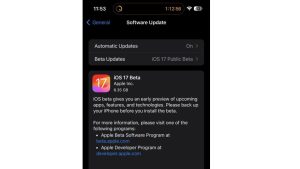
To use watchOS 10 beta, the initial step involves installing iOS 17 beta on your iPhone. Check our detailed guide for instructions on accessing the iOS 17 beta specifically for iPhones. Upon completing the registration for betas,, navigate to Settings > General > Software Update on your iPhone. Select “iOS 17 Public Beta,” go back, and tap “Download and Install.”
Prepare Your Apple Watch
Ensure your Apple Watch is running at least watchOS 9.4. In order to validate this information, please open up your Watch application followed by selecting either ‘About’ or ‘Software Update’ from within the section labeled as ‘General’. In case you require it, obtain the newest non-beta edition of watchOS. if needed. Verify that your Apple Watch is properly connected to its charger, close enough to the paired iPhone, having Wi-Fi activated. Charging the watch is also recommended to reach a minimum of 50%.
Download the watchOS 10 Beta
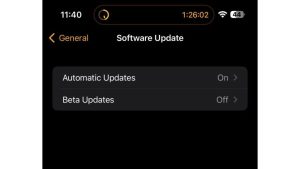
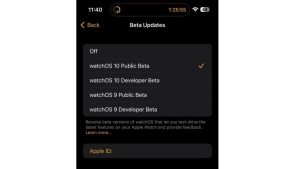
After your Apple Watch is prepared, Start the Watch app on your iPhone and proceed to General > Software Update. Alternatively, access the beta by going to Settings > General > Software Update on your Apple Watch. Find the option called “Beta Updates”, tap “watchOS 10 Public Beta,” and “Download and Install.” can be clicked to proceed. Wait until completion of the process.
Conclusion:
watchOS 10 is a feature-rich update giving Apple Watch users access to multiple enhancements. While downloading the beta lets you experience these enhancements ahead of time, Keep in mind that the download might be slow because of its large size. Deliberate carefully on whether you should give the beta a shot or postpone until the stable version is released in September. Since the public beta is typically more reliable than previous developer previews, your experience should remain relatively hassle-free. There’s a good chance that Apple will introduce extra watchOS 10 betas featuring improved stability and refinement as the official release date gets closer. In case you have a strong desire to discover further, you could also contemplate downloading the iPadOS 17 beta. No matter what you decide, The upcoming release of the Apple Watch 9 and iPhone 15 line ensures an exhilarating September.





