



Tara Task Manager’s Best Features for Cross-Functional Teams
- Productivity
- August 14, 2023
- No Comment
- 28
Introduction To Tara Task Manager
Tara is a smart platform that empowers you and your team to move faster in the game through artificial intelligence (AI)-driven project management. This article will outline the best features of this app that you should know before trying it out or making it a part of your project team.
1. Drag and Drop in Tara’s Task Drawer
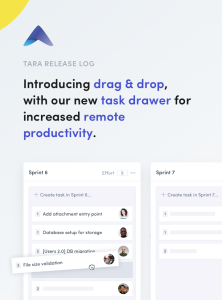
Visualization of the Drag and Drop Task Drawer of Tara app This is a beneficial feature for the development or service delivery teams that work remotely. The task drawer comes with a stacked interface and the drag-and-drop action for the organization of tasks. Using this, you can seamlessly select a task and assign it to different sprints by dragging and dropping.
This feature of the Tara app is useful during sprint planning for teams who want to accelerate tasks from their backlog. Here, you can also check the task ID and author name on top of every task modal. Apart from these, the task drawer also offers an updated sprint report for an efficient workflow.
2. Integrate Third-Party Apps to Import Projects and Tasks
An image showing available integrations in Tara app Manually inserting data into your collaboration tool from other applications is a time taking and hectic process. Tara offers the feature of task import from third-party tools like Trello snd Slack.
If you use Trello or Asana for task management, you can import the tasks and projects into Tara in a few simple steps. All you have to do is to click on Workspace settings and then select the Integrations tab. Now, either choose Trello or Asana to import tasks to Tara.
Tara also allows integration with Slack if you use the latter for team communication. After performing the Tara and Slack integration with double authentication, you will get instant updates from Slack conversations within the tasks.
3. Multi-Workspaces
3 Images Visuals to show creation of Multi Workspace in Tara Visualization of workspace creation in Tara Visual showing requirements creation in Tara
This feature extends a lot of flexibility to teams that work in more than one development or service-delivery project. It enables you to switch between your personal and team workspaces for an organized task dashboard experience. At the same time, you can swap between workspaces for multiple projects, clients, or organizations.

Creating, joining, and switching between multiple Tara workspaces is easy. You can join unlimited workspaces according to your need. You may also split any task or project from one workspace and add that to another workspace.
4. Advanced Text Editor
An image showing advanced text editor in Tara With Tara’s text editor, you can style the text with bullet points, numbered lists, and strikethrough font style. It also prevents lags during text selection and cursor movement.
You will get a notification if someone else is editing and saving a task or a requirement at the same time. Besides making you aware of the data overwriting, it will give you a chance to save the data before others make any changes. You can also preserve the markdown format if importing software codes from GitHub.

5. Smart Labels and Search
Visualization of #labels and search in Tara app With #Labels and Search options, teams will have a higher velocity and organized workflow. You may include labels in the task description and titles. Other ways to use labels are to distinguish:
- Task type
- Task status
- Task priority
The new Search tasks bar on the sprint page allows you to locate any task instantly. The search framework spread across the sprints will let you search and identify tasks of any sprint based on their titles. Use a hashtag for entering a label name as you can add unlimited labels to a task.

Project Management Made Easy With AI and ML
With the above-mentioned features of project management and collaboration, teams can successfully deliver services or products faster than ever before. These are the most useful task and sprint management features for cross-functional team productivity. However, before investing money in any project management app, it’s a good idea to consider proven tips that will ensure you pick the appropriate tool.





