




Unlocking Supercharged Productivity: Harnessing Spreadsheets for Efficiency
- Productivity
- September 6, 2023
- No Comment
- 30
Introduction: Supercharged Productivity
In today’s fast-paced world, efficiency is the key to success. From managing daily tasks to tracking project progress, the ability to streamline your workflow can make a significant difference in your productivity. While most of us associate spreadsheets like Excel with numbers and data, they are versatile tools that can supercharge your productivity when used effectively.
Tabulating Tasks and To-Do Lists
One of the simplest yet most potent ways to boost your productivity is by creating organized task lists or to-do lists using spreadsheets. You can harness the power of columns to categorize tasks based on priority, deadlines, status, or any other criteria that suit your workflow.
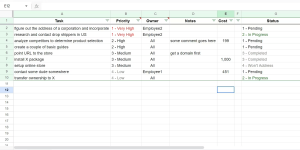
Spreadsheets offer an excellent feature known as conditional formatting. This feature allows you to highlight essential tasks or apply data validation rules to streamline your selections. With conditional formatting, you can focus on tasks that require immediate attention, ensuring that you stay on top of your objectives.
For instance, you can use conditional formatting to highlight tasks that must be completed today, this week, or in the near future. This makes it easy to identify which tasks need immediate action and which ones can wait.
Filtering and Sorting for Enhanced Organization
Spreadsheets provide you with the ability to filter and sort your data according to your specific needs. Filtering allows you to display only the relevant rows, such as tasks due today or those assigned to a particular team member. Sorting, on the other hand, helps you arrange information by priority, deadline, or completion date.
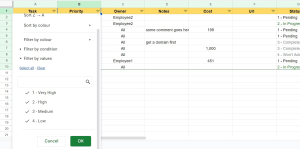
This intuitive method of organization empowers you to locate essential data swiftly, prioritize tasks efficiently, and optimize your workflow. It’s particularly valuable when collaborating with a team or managing complex projects where different views of the data are essential.
For instance, you can effortlessly track pending tasks by priority level. Just filter by “pending” and sort by priority to see a list of pending tasks categorized by their priority levels. Alternatively, you could filter by priority and sort by status for a different perspective on the same data.
Record Completed Tasks for Tracking Growth
Spreadsheets can be your silent partners in tracking progress and accomplishments. Instead of erasing completed tasks, consider archiving them in a dedicated sheet or tab. You can also utilize essential formulas and functions to quantify completed tasks within specific timeframes, assess time investment, and evaluate alignment with your objectives.
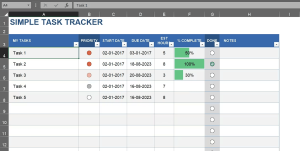
Conditional formatting plays a crucial role here as well. You can use it to highlight achievements and pinpoint areas for improvement. This approach allows you to measure your performance, recognize your strengths, and gain insights through charts or graphs that visualize your growth and trends over time.
Areas where this method can be applied include personal project management, effective time management, identifying project bottlenecks, and more.
Time Tracking and Productivity Analysis
Spreadsheets, coupled with timesheet templates or custom creations, can revolutionize your time management and productivity assessment. By logging task, project, and activity start and end times, you can use formulas to compute durations, percentages, and averages.
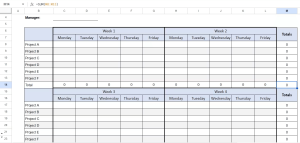
Visualizing these insights through charts helps you understand how you spend your time and where you can improve. Tracking productivity patterns becomes a breeze, and you can make data-driven decisions to enhance your efficiency.
Additionally, timer functions can simplify time tracking by automatically designating start and end times, calculating task durations, and aggregating data for comprehensive analysis.
In a world where every minute counts, harnessing spreadsheets for supercharged productivity can be your secret weapon. Whether you’re managing personal tasks or collaborating on complex projects, these versatile tools empower you to optimize your workflow, maximize efficiency, and achieve your goals with precision.
So, why stick to mundane tasks when you can unlock the full potential of spreadsheets and embark on a journey towards unparalleled productivity?
Summary Table
| Method | Purpose |
|---|---|
| Tabulating Tasks and To-Do Lists | Efficiently organize and prioritize tasks with conditional formatting for focused task management. |
| Filtering and Sorting for Enhanced Organization | Quickly locate relevant data and arrange information to streamline workflow and collaboration. |
| Record Completed Tasks for Tracking Growth | Archive completed tasks, quantify achievements, and visualize growth using conditional formatting. |
| Time Tracking and Productivity Analysis | Log task durations, analyze productivity patterns, and make data-driven decisions for efficiency. |
Conclusion
In a world where time is a precious commodity, the ability to optimize productivity can significantly impact personal and professional success. Spreadsheets, often seen as tools for managing numbers, prove to be versatile allies in this endeavor.
By leveraging spreadsheets effectively, you can transform your task management, enhance organization, track progress, and gain insights into your productivity patterns. Whether you’re a project manager, a team leader, or an individual striving for better time management, these methods can help you supercharge your productivity.
So, the next time you open Excel, Google Sheets, or any other spreadsheet application, remember that you hold the key to unlocking efficiency and achieving your goals with precision.
Don’t settle for mundane tasks when you can harness the full potential of spreadsheets to embark on a journey towards unparalleled productivity.





