



macOS Server Discontinued: Migration and Alternatives
- Tech news
- July 27, 2023
- No Comment
- 23
Introduction
As of April 21, 2022, Apple made a significant decision to discontinue macOS Server. This came as a surprise to many macOS Server users.Who have relied on its capabilities for various server-related tasks. In this article, we will explore the implications of this discontinuation and the options available to existing macOS Server users. Fortunately, even though macOS Server is no longer being actively developed, existing customers can still download and utilize the app with macOS Monterey. Additionally, some essential services have been integrated into macOS itself, allowing users to access them at no extra cost. Let’s dive deeper into what this means for macOS users and explore the migration and alternative options available.
The Discontinuation of macOS Server
After many years of providing server-related services to macOS users, Apple decided to discontinue macOS Server as of April 21, 2022. This announcement left existing users wondering about the future of their server setups and the services they have come to rely on. Although macOS Server is no longer receiving updates and new features, Apple has not entirely abandoned its users. Existing customers can still download and utilize macOS Server with macOS Monterey, but they should be aware that no new versions will be released beyond macOS Server 5.7.1.
Essential Services Now Bundled with macOS
To ease the transition for macOS Server users, Apple has bundled some of the most popular server features with macOS High Sierra and later versions. These services include:
- Caching Server: Efficiently caches macOS and app updates on a local network, reducing internet bandwidth usage and speeding up the update process for multiple devices.
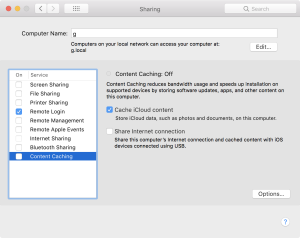
image by:https://georgegarside.com/ - File Sharing Server: Facilitates easy file sharing and collaboration between users on the same network, eliminating the need for a separate file server setup.
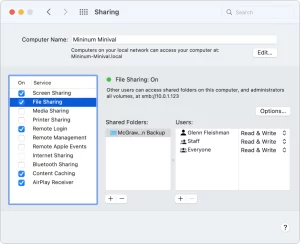
image by:https://www.macworld.com/ - Time Machine Server: Allows users to back up their macOS devices to a central server, providing a convenient and secure backup solution.

With these services now included with macOS, Apple aims to ensure that more customers have access to essential server functionalities without the need for a dedicated macOS Server installation.
Migrating from Profile Manager to Other MDM Solutions
One of the key services provided by macOS Server was Profile Manager, which allowed administrators to manage macOS and iOS devices on their network. With the discontinuation of macOS Server, users who relied on Profile Manager need to consider alternative Mobile Device Management (MDM) solutions.
Choosing the right MDM solution is crucial for seamless device management. Users can explore various third-party MDM providers that offer robust features and support for macOS and iOS devices. It’s essential to evaluate each solution’s capabilities, scalability, security, and ease of use before making a decision.
Services: From macOS Server to macOS – What’s Changed?
As macOS Server is no longer under active development, certain services that were previously available in macOS Server have been discontinued or migrated to other options. Here’s a list of services and their current status:
- Profile Manager: Available in macOS Server 5.12.2, this service continues to provide device management capabilities.
- Xsan: This service has been removed in macOS Server 5.12. Users can consider using third-party solutions like Quantum or utilize the command-line tools built into macOS for Xsan management.
- FTP: FTP service was removed in macOS Server 5.4. Users can adopt more secure alternatives like SFTP/SSH for file transfer.
- Server Docs: Also removed in macOS Server 5.4, users can switch to iCloud Documents or use Apache/WebDAV for document sharing and collaboration.
- DHCP: UI tools for DHCP were removed in macOS Server 5.7.1, but macOS offers built-in support for DHCP through bootpd.
- DNS: The DNS service was removed in macOS Server 5.7.1. Users can opt for alternative DNS solutions like BIND, Unbound, or KnotDNS.
- VPN: Also removed in macOS Server 5.7.1, users can use third-party VPN solutions like OpenVPN, SoftEther VPN, or WireGuard.
- Firewall: UI tools for the firewall were removed in macOS Server 5.7.1. However, macOS includes a built-in pf firewall for network security.
- Mail Server: Removed in macOS Server 5.7.1, users can consider other mail server solutions like dovecot/Postfix, Courier, or KerioConnect.
- Calendar: This service was removed in macOS Server 5.7.1. Users can choose alternatives like CalendarServer, DavMail, Radicale, or Kerio Connect.
- Wiki: Wiki service was removed in macOS Server 5.7.1. Consider using MediaWiki, PmWiki, XWiki, Confluence, or WordPress for managing wikis.
- Websites: UI tools for managing websites were removed in macOS Server 5.7.1. Users can utilize built-in macOS tools like Apache HTTP Server or explore Nginx and Lighttpd.
- Contacts: Contacts service was removed in macOS Server 5.7.1. Users can switch to CalendarServer, DavMail, or Kerio Connect.
- NetBoot/NetInstall: UI tools for NetBoot/NetInstall were removed in macOS Server 5.7.1. macOS includes built-in support for BOOTP, TFTP, HTTP, and NFS, while other options include NetSUS and BSDPy.
- Messages: This service was removed in macOS Server 5.7.1. Users can explore alternatives like ejabberd, Openfire, or Prosody.
- Radius: Removed in macOS Server 5.7.1, users can opt for FreeRadius for authentication and authorization needs.
- AirPort Management: This service was removed in macOS Server 5.7.1. Users can manage their AirPort devices using the AirPort Utility application.
Conclusion
While the discontinuation of macOS Server may have caught some users off guard. Apple has made efforts to ease the transition by integrating essential server features into macOS itself. Existing macOS Server customers can continue using the app with macOS Monterey, and popular services like Caching Server, File Sharing Server, and Time Machine Server are now included with macOS at no extra cost. For those relying on Profile Manager, exploring alternative MDM solutions is essential to continue efficiently managing macOS and iOS devices. As macOS continues to evolve, third-party solutions and built-in macOS services offer various options for users to continue their server-related activities with ease.





