



How to Unenroll from Apple’s Public Beta Software Program – A Step-by-Step Guide
- Tech news
- July 27, 2023
- No Comment
- 27
Introduction:
Through the Apple public beta software program, macOS and iOS device users may test out and explore the newest updates and features ahead of their public release. Users can return to stable software versions, but Apple could still give beta releases to both users and itself. Learn how to get off the Beta Software Program on your Mac and iPhone devices with this tutorial.
Unenrolling Your Mac:
If you want to unenroll your Mac from the Apple Beta Software Program, follow these steps:
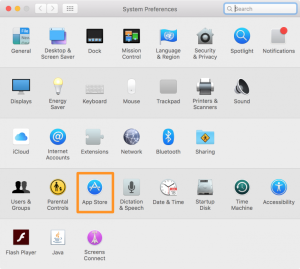
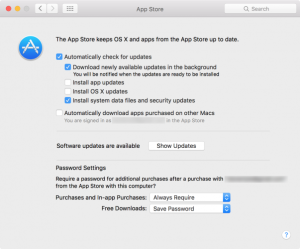
1.Launch the “System Preferences” app on your Mac and go to the “App Store” preferences pane.
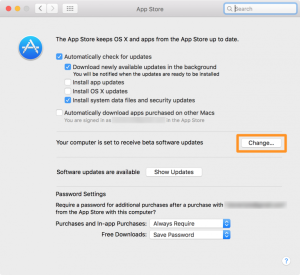
2.Click on the “Change” button located to the right of the text “Your computer is set to receive beta software updates.”
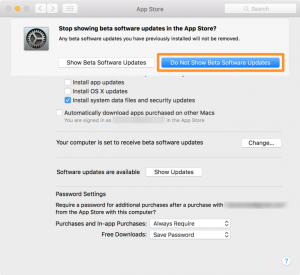
3.Do Not Show Beta Software Updates This action will remove your Mac from the Apple Beta Software Program.
4.Relaunch the ‘Settings’ app. After that, revisit the ‘App Store’ preferences. The words “Your computer is set to receive beta software updates” should no longer be present, signifying that you have properly unenrolled your Mac.
Unenrolling Your iPhone, iPod touch, or iPad:
To stop receiving beta updates on your iOS device, follow these steps:
1.The power off slider can be pulled to switch off your iOS device by pressing and holding the power button.
2.Ensure that the iTunes program is operating and link your iOS device to the computer with the USB sync cable.
3.To connect your iOS device to your computer, keep your Home button pressed. You must first push and hold the Home button until the ‘Connect to iTunes’ symbol is visible and then release it to pair your phone to iTunes.
4.Restore your device when iTunes determines that it is in recovery mode.
5.In iTunes, clicking the ‘Restore’ button will reinstall a firmware copy on a smartphone. The subsequent step is to restore your iOS device from iCloud or iTunes
Conclusion:
Those who desire the newest version of software and decide to take part in the Apple’s Public Beta Software Program can easily unsubscribe. You can disable the beta update service for Mac and iOS devices with the aid of the given article and hence utilize the regular version of the software instead. Remember that beta software may have glitches and problems, but unregistering lets you enjoy a more reliable and polished user experience.





