



Unmasking AI: How to Spot AI-Generated Images in 4 Steps
- ProductivityTechnology Explained
- September 1, 2023
- No Comment
- 26
The AI Image Conundrum
In an era of remarkable AI image generators like DALL-E and Midjourney, distinguishing AI-generated images from real ones has become a captivating challenge. But fear not, for we’ve gathered four expert methods to help you unveil the secrets of AI-created visuals. AI has blurred the line between reality and artistry. Whether you’re an art enthusiast, a content creator, or just curious, you’ll find these methods invaluable in deciphering AI-generated visuals.
1. Investigate the Metadata
Begin your detective work by examining the image’s metadata:
- Title and Description: Look for any mention of AI in the title or description. Some creators are forthcoming about their use of AI, providing vital clues.
- Comments Section: Explore the comments section; the author or other users might reveal the image’s AI origin.
- Profile Page: A creator’s profile may hold valuable information. Keywords like “Midjourney” or “DALL-E” can indicate AI involvement.

Image by https://www.makeuseof.com/ 
Image by https://www.makeuseof.com/ 
Image by https://www.makeuseof.com/
2. Follow the Watermark Trail
Watermarks are a common trait of AI-generated images:
- DALL-E’s Mark: DALL-E places a subtle watermark, typically five squares with distinct colors, in the bottom right corner. Spotting this mark confirms AI creation.
- Watermark Removal: Be aware that removing the watermark isn’t against guidelines, as long as you don’t misrepresent the image.
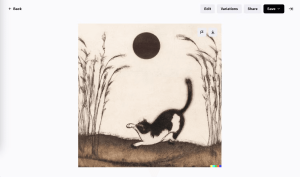
Image by https://www.makeuseof.com/
3. Examine AI-Induced Distortions
AI-generated images often bear peculiar distortions:
- Hidden Oddities: Observe the finer details; some AI art appears normal from a distance but reveals oddities upon closer inspection, similar to impressionist paintings.
- Human Portraits: AI-created human portraits might display inconsistencies, such as missing earrings, blurry backgrounds, or gibberish text.
- Unnatural Elements: Pay attention to elements like hands, which AI often struggles to depict realistically. Extra fingers or awkward poses are telltale signs.

Image by https://www.makeuseof.com/
4. Employ an AI Image Detector
While human scrutiny is valuable, technology can assist:
- AI Image Detectors: Tools like Optic’s “AI or Not” can help identify AI-generated images by analyzing known AI markers. However, results may not always be foolproof.
- Use with Caution: Rely on AI detectors in combination with other methods due to the potential for inaccurate results. Continued development may yield more reliable tools in the future.
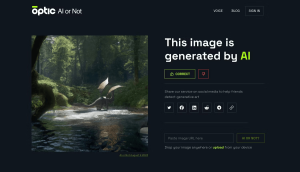
Image by https://www.makeuseof.com/
The Future of AI Identification
As AI continues to advance, the line between real and AI-generated images will blur further. Detecting AI will become increasingly challenging, but hope remains:
- Upcoming Tools: Keep an eye on evolving AI detection tools that promise greater accuracy.
- Transparency: Follow OpenAI’s advice to creators to disclose AI involvement, ensuring honest representation.
In the end, identifying AI-generated images is a skill that will evolve alongside AI technology. By combining these methods, you can become a proficient detective in the intriguing world of AI art.
| Method | How to Identify AI-Generated Images |
|---|---|
| 1. Investigate Metadata | Check Title, Description, Comments, and Profile |
| 2. Follow the Watermark | Look for DALL-E’s Watermark |
| 3. Examine Distortions | Observe Hidden Oddities and Unnatural Elements |
| 4. Use AI Image Detector | Employ Tools with Caution for Assistance |
And here’s a comparative table outlining some common features or benefits of each method:
| Method | Features/Benefits |
|---|---|
| 1. Investigate Metadata | – Relies on textual clues |
| – User-generated information | |
| 2. Follow the Watermark | – Direct visual confirmation |
| – Watermark signifies AI usage | |
| 3. Examine Distortions | – Detects subtle anomalies |
| – Applies to various types of AI-generated art | |
| 4. Use AI Image Detector | – Technology-assisted identification |
| – Analyzes known AI markers |
These tables provide readers with a quick and visual overview of the methods discussed in the article, making it easier for them to grasp the key points.





