




Mastering Your Finances: How to Efficiently Track Expenses with Google Sheets
- Productivity
- September 12, 2023
- No Comment
- 36
Introduction: Efficiently Track Expenses with Google Sheets
In today’s fast-paced world, managing your finances effectively is more critical than ever. Keeping a close eye on your expenses is a fundamental step towards financial security and achieving your monetary goals. Fortunately, you don’t need fancy software or complex spreadsheets to get started. Google Sheets, a free and user-friendly tool, can be your key to mastering your finances.
In this guide, we will explore why tracking expenses is essential, and I’ll walk you through setting up an efficient expense tracking system using Google Sheets. Whether you’re a budgeting novice or a finance-savvy individual, these steps will empower you to take control of your money.
Why Should You Track Expenses?
Tracking expenses is the best way to save your money. Knowing your monthly expenses against your income empowers you to make better financial decisions.
Financial Awareness: Tracking expenses is the cornerstone of sound financial management. It provides you with a clear picture of where your money is going, allowing you to make informed decisions. By understanding your spending habits, you gain financial awareness, a crucial first step in achieving your financial goals.
Debt Management: High levels of debt can be a significant financial burden. Tracking your expenses helps you identify areas where you can cut back, freeing up resources to tackle debt. It’s your roadmap to a debt-free future.
Prioritizing Spending: Not all expenses are created equal. Tracking your expenses reveals patterns and highlights areas where you may be overspending. You can then reallocate your income to priorities that matter most to you, whether it’s saving for a dream vacation or investing in your future.
Planning for the Future: To plan for the future, you need data from the present. Tracking expenses allows you to anticipate financial changes. For example, if your rent keeps increasing, you’ll be prepared to adjust your budget accordingly.
Setting Up Your Spreadsheet to Track Expenses
Now that we’ve established why tracking expenses is crucial, let’s dive into how to set up a practical expense tracking system using Google Sheets.
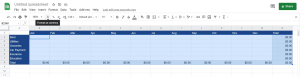
1. Labeling Columns and Rows
Begin by opening a blank Google Sheet. Label the columns with the months of the year in Row 1 and the expense categories in Column A. Don’t forget to add a “Total” category. To enhance readability, consider changing the colors of the month, category, and total headers. Additionally, highlight empty cells and format them as currency.
2. Adding Simple Functions
To automate the tracking process, you’ll need to add functions that calculate the totals for you. Follow these steps:
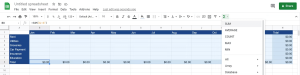
- Click on the “Total” field under January.
- Click the “Functions” icon and select “SUM.”
- Click the B2 cell, hold the shift key, and click the B7 cell. Then, press Enter.
- Repeat the above steps for all other months (C8-M8).
Now, whenever you enter an expense for a specific month, the total for that month will be calculated automatically, saving you time and effort.
3. Adding Total Functions
To track yearly totals for each expense category, add total functions as follows:
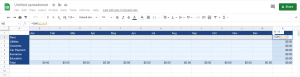
- Click on field N2.
- Click the “Functions” icon and select “SUM.”
- Click the B2 cell, hold the shift key, and click the M2 cell. Then, press Enter.
- Repeat this process for all other categories (N3-N8).
Your Google Sheet is now ready to start recording your monthly expenses effectively.
Conclusion
Mastering your finances begins with understanding where your money goes. By using Google Sheets to track your expenses, you gain valuable insights into your spending habits, enabling you to make informed financial decisions. Start today, and take control of your financial future.





