




Browse Reddit Anonymously: Tips for Private Browsing
- Internet and TelecomProductivity
- August 31, 2023
- No Comment
- 26
How to Browse Reddit Anonymously
Reddit, the vast universe of online communities, offers a plethora of intriguing discussions and content. However, your privacy might be a concern as your activity is often tracked. If you’re looking to enjoy a more private browsing experience on Reddit, you’re in luck. This article delves into the world of Anonymous Browsing, uncovering how to explore Reddit without your actions being associated with your account. Let’s dive in and unlock the secrets of anonymous browsing on Reddit.
Reddit’s Anonymous Browsing Unveiled

While your Reddit username might not reveal your identity, the platform still uses cookies and IP addresses to tailor your browsing experience. This enables Reddit to customize content for individual users. With Anonymous Browsing, this tracking is disabled—a sort of Reddit incognito mode. During anonymous browsing, your activities remain separate from your account. It’s akin to having an undisclosed alter ego on the platform.
Furthermore, your username won’t be linked to any anonymous browsing activity, and all actions conducted during this mode are deleted upon returning to normal browsing. Notably, Reddit refrains from saving your search and browsing history during anonymous browsing, ensuring complete privacy.
Enabling Anonymous Browsing on the Reddit App

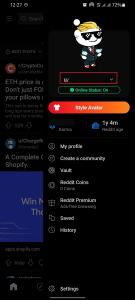
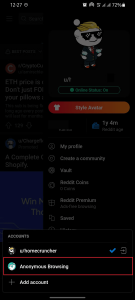
To embark on a private Reddit journey via your mobile device, Anonymous Browsing mode can be activated through the app. Follow these steps:
- Open the Reddit app on your device.
- Tap on your Avatar to access the account menu.
- Click the downward-facing arrow next to your username.
- Choose “Anonymous Browsing” from the menu.
With these simple steps, your Reddit interactions remain incognito, free from association with your account.
Exploring Anonymous Browsing on Google Chrome
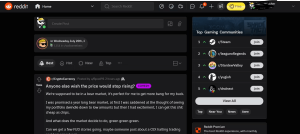
Desktop users can simulate anonymous browsing through Google Chrome’s Incognito mode, as the Reddit Anonymous Browsing feature is mobile-exclusive at the moment. Here’s how:
- Open your browser and click the three dots in the top-right corner.
- Select “New Incognito Window” from the dropdown menu.
- Avoid logging into your Reddit account and start browsing.
Upon concluding your anonymous exploration, simply close the Incognito window or tab, returning to regular browsing. While Incognito mode has limitations, it offers an effective means of private Reddit browsing on desktop.
The Whys of Anonymous Browsing
Why opt for anonymous browsing on Reddit? Several motivations come into play:
- Privacy Concerns: If you’re cautious about being tracked online, anonymous browsing is a shield against unwanted surveillance.
- Targeted Ad Avoidance: Anonymous browsing shields you from personalized ads, allowing for a clutter-free experience.
- Stealthy Observing: It’s a way to view content without leaving traces or judgments, maintaining an observer’s role.
- Diverse Content Exploration: Anonymous Browsing unveils content that your regular account might overlook.
- Unbiased Research: Engage in unbiased topic research without influencing your feed’s content.
- Evading Subreddit Bans: If you’re banned from a Subreddit, Anonymous Browsing lets you access its content.
Navigating Reddit Incognito
Now that you’re equipped with the knowledge of anonymous browsing, you can traverse Reddit’s realms with peace of mind. Leverage the advantages of Anonymous Browsing, uncovering hidden content and maintaining your privacy. Whether you’re a privacy-conscious user or a content explorer, anonymous browsing offers a versatile and secure way to experience Reddit without compromise. Activate Anonymous Browsing and immerse yourself in the diverse discussions and intriguing content Reddit has to offer.





