




9 Essential Firefox Add-Ons for Research Students
- Internet and TelecomProductivity
- September 20, 2023
- No Comment
- 41
Introduction: 9 Essential Firefox Add-Ons
As a research student, your web browser is your trusty companion in the quest for knowledge. Firefox, known for its flexibility and customization, can become an even more powerful tool with the right add-ons. Whether you’re a master of organization or in need of some focus-enhancing features, we’ve curated a collection of essential Firefox add-ons to supercharge your research journey. Let’s dive into these invaluable tools that will elevate your research skills and help you make the most of your browser.
1. PowerNotes Research
Description: PowerNotes is your intuitive per-project note-taking companion. With this add-on, you can seamlessly gather excerpts from texts, add bookmarks, and even capture in-app screenshots, all while dedicating a significant portion of your screen to your research.
Details: PowerNotes Research is your research companion that simplifies note-taking and bookmarking. It provides a user-friendly interface for capturing and organizing excerpts from texts. With the ability to add bookmarks and take in-app screenshots, it offers comprehensive research support. Importantly, PowerNotes Research allows you to allocate a substantial part of your screen to your research, ensuring you have ample space for organizing your notes and bookmarks effectively.
2. Notes by Firefox
Description: For those who prefer minimalism, Notes by Firefox offers essential note-taking capabilities. You can conveniently scale the popup to your preferred size, and exporting all your notes is just a click away.
Details: Notes by Firefox caters to the minimalist student who values simplicity. This add-on provides fundamental note-taking functionality without unnecessary frills. Its customizable popup size ensures that it adapts to your preferences. Additionally, exporting all your notes is made hassle-free with a single click, making it a straightforward yet effective tool for organizing your research notes.
3. Google Keep Notes
Description: Google Keep Notes offers simplicity with its sleek design and cross-device syncing. Take notes on your PC or laptop and access them seamlessly on your smartphone, ensuring your ideas are never lost.
Details: Google Keep Notes is designed for students who value simplicity and seamless synchronization across devices. Its intuitive, sleek design makes note-taking a breeze. You can create notes on your PC or laptop and access them effortlessly on your smartphone, ensuring that your research ideas are always within reach, no matter where you are.
4. Symbaloo Bookmarker
Description: Symbaloo Bookmarker redefines bookmarking. Color-code and categorize your bookmarks with ease. Unlike conventional popups, Symbaloo opens in its own page, providing a clutter-free experience for managing your research resources.
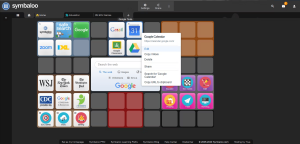
Details: Symbaloo Bookmarker offers a revolutionary approach to bookmarking, allowing you to organize your resources with color-coded categories. Unlike typical popups, Symbaloo opens in a separate page, providing a clutter-free environment for efficiently managing your research bookmarks. This tool enhances your research organization by offering a visually appealing and user-friendly experience.
5. Pocket Select All
Description: Pocket Select All is your article-oriented research companion. Pin articles and research papers for later reading. Sync your saved content across devices and make the most of your time wherever you are.
Details: Pocket Select All is tailored for research students focused on articles and research papers. It allows you to pin articles and papers for future reading, ensuring that you don’t miss out on valuable content. The synchronization feature ensures that your saved content is accessible across all your devices, maximizing your productivity and enabling efficient research even when you’re on the go.
6. Dictionary Anywhere
Description: Say goodbye to endless Google searches for word definitions. Double-click any unfamiliar word, and Dictionary Anywhere pops up with its definition. Customize it to translate words into your native language, supporting English, French, German, and Spanish.
Details: Dictionary Anywhere simplifies the process of looking up word definitions. By double-clicking an unfamiliar word, this add-on instantly displays its definition. Moreover, you can customize it to provide translations into your native language, with support for English, French, German, and Spanish. This tool enhances your research by making it easier to understand complex terminology.
7. Google Scholar Button
Description: Google Scholar enthusiasts, rejoice! The Google Scholar Button is here for effortless access to credible sources. A single click on the icon initiates your scholarly search in a convenient popup, saving you time and effort.
Details: The Google Scholar Button is a must-have for research students seeking credible sources. Instead of navigating through bookmarks or typing in search queries, this add-on simplifies the process. With a single click on the icon, you can initiate a scholarly search in a convenient popup, streamlining your access to valuable research materials.
8. Side View
Description: Side View is your digital equivalent of having two books open at once. Browse two pages simultaneously without the hassle of constant switching. It’s user-friendly—load your desired pages and click the split-page icon to enhance your research efficiency.
Details: Side View is designed to enhance your research multitasking. It allows you to browse two web pages simultaneously, mimicking the experience of having two books open at once. This user-friendly tool simplifies your workflow—load your desired pages and click the split-page icon to boost your research efficiency.
9. Search Preview
Description: Ever wish you could peek inside a webpage before clicking, just like browsing a book? Search Preview grants you that power. Get a glimpse of search results on Google, Yahoo, DuckDuckGo, and Bing, ensuring you find the most relevant sources.
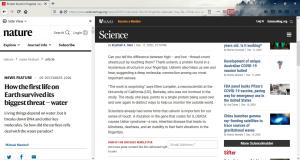
Details: Search Preview revolutionizes your search experience. Instead of blindly clicking on search results, this add-on provides a preview, allowing you to glimpse the content of webpages before committing to them. It supports popular search engines like Google, Yahoo, DuckDuckGo, and Bing, ensuring you find the most relevant and valuable sources for your research.
| Category | Add-On | Description | Download Link |
|---|---|---|---|
| Notes and Bookmarks | PowerNotes Research | PowerNotes is an intuitive per-project note-taking companion. Gather excerpts, add bookmarks, and take in-app screenshots with ease. | Download |
| Notes by Firefox | Notes by Firefox offers essential note-taking capabilities with minimalism in mind. Scale the popup and export your notes effortlessly. | Download | |
| Google Keep Notes | Google Keep Notes offers sleek design and cross-device syncing for easy note-taking and access across devices. | Download | |
| Symbaloo Bookmarker | Symbaloo Bookmarker redefines bookmarking with color-coding and categorization. Manage bookmarks clutter-free. | Download | |
| Pocket Select All | Pin articles and research papers with Pocket Select All. Sync your saved content across devices for efficient reading. | Download | |
| Research Tools | Dictionary Anywhere | Dictionary Anywhere provides word definitions on the fly. Customize translations in multiple languages. | Download |
| Google Scholar Button | Access Google Scholar effortlessly with this add-on. Start your scholarly search in a convenient popup. | Download | |
| Side View | Side View allows browsing two pages simultaneously. Enhance your research efficiency with split-page browsing. | Download | |
| Search Preview | Preview search results before clicking. Get a glimpse of webpages and find the most relevant sources. | Download |
Please note that the “Download” links are currently placeholders (#) since I don’t have direct access to external download links. You can replace them with the actual download links when you publish your article.
Anti-Distraction
The battle against distractions is real, especially when you’re deep into research. Fortunately, Firefox has add-ons that help you regain control and maintain your focus. In the next section, we’ll explore these anti-distraction tools that can be a game-changer for research students.
Conclusion
In your pursuit of knowledge, these Firefox add-ons will be your trusted allies. From efficient note-taking to accessing credible sources and eliminating distractions, these tools will elevate your research game. Remember, Firefox is not just a browser; it’s your gateway to a world of possibilities. Download these add-ons today and embark on a research journey like never before.





