


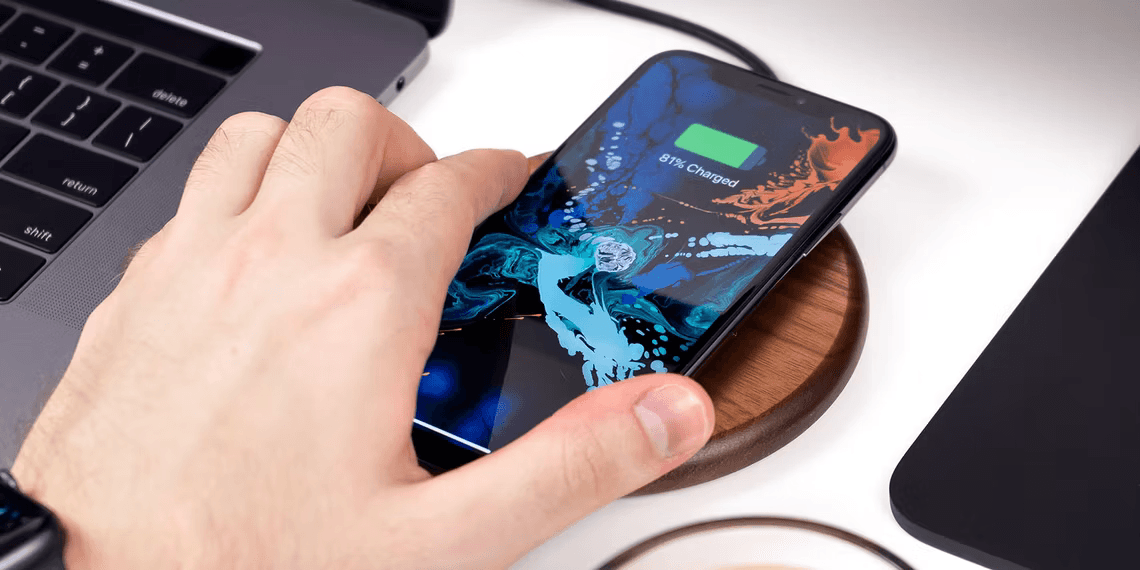

Why Your iPhone Stops Charging at 80%: Solutions and Insights
- Technology Explained
- September 5, 2023
- No Comment
- 53
Why Does My iPhone Stop Charging at 80%?
If you’re an iPhone user, you’ve probably encountered a common issue: your iPhone stops charging at 80%. Before you rush to replace your device, let’s delve into why this happens and how you can resolve it.

The Role of Optimized Battery Charging
Your iPhone is equipped with a clever feature called “Optimized Battery Charging.” This feature is designed to enhance your iPhone’s battery life by preventing overcharging. It limits the charge to 80% to reduce stress on the battery.
But what if this feature is turned off, and your iPhone still refuses to charge past 80%? Here’s the scoop.

Battling the Heat
Sometimes, your iPhone might halt charging at 80% due to excessive heat during the charging process. When the temperature rises, the software steps in and decides to cap the charging at 80% to prevent overheating.
So, if you find your iPhone in this predicament, it’s best to unplug it for a short while and let it cool down to a normal temperature. After about 15 minutes, plug it back in and see if it resumes charging.
A word of advice: Never resort to extreme measures like putting your iPhone in the fridge or freezer to cool it down. Rapid temperature changes can harm the battery, speed up its aging, and, in rare cases, lead to battery swelling. Instead, learn how to charge your iPhone correctly.
How Optimized Battery Charging Prolongs Your iPhone’s Lifespan
Now that you understand why your iPhone stops charging at 80%, let’s explore how Optimized Battery Charging actually contributes to extending your iPhone’s lifespan.
The Imbalance Dilemma
The fundamental issue with keeping your phone fully charged all the time is that it accelerates the degradation of lithium-ion batteries. These batteries degrade faster when they consistently remain fully charged or completely empty.
Imagine charging your iPhone overnight, where it stays at 100% charge for hours on end. This constant high charge is detrimental and speeds up battery aging.
Delayed 100% Charging
Optimized Battery Charging intervenes by preventing your iPhone from reaching 100% charge too quickly. Instead, it learns your usage patterns and ensures that your device only reaches a full charge right before you wake up in the morning.
This intelligent approach allows your iPhone to be fully charged when it’s needed, without idling at full charge overnight. As a result, it significantly contributes to preserving your iPhone’s battery health and extending its overall lifespan.
How to Turn Off Optimized Charging on Your iPhone
Now, what if you prefer to charge your iPhone to 100% every time? You can easily disable the Optimized Battery Charging feature.
Here’s how:
- Go to Settings on your iPhone.
- Tap on Battery.
- Select Battery Health.
- Toggle off Optimized Battery Charging.
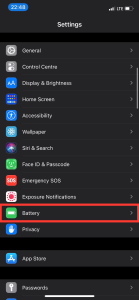
Image by https://www.makeuseof.com/ 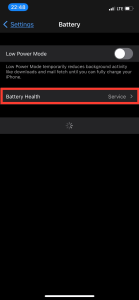
Image by https://www.makeuseof.com/ 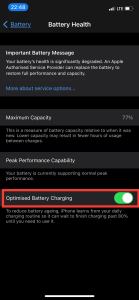
Image by https://www.makeuseof.com/ 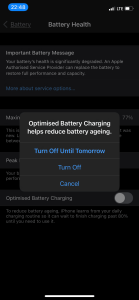
Image by https://www.makeuseof.com/ - Choose between “Turn Off Until Tomorrow” or “Turn Off Permanently.”
However, it’s worth noting that if you own a larger iPhone like the iPhone 14 Pro Max or iPhone 14 Plus, you may want to reconsider turning off Optimized Battery Charging. These models already offer impressive battery life, even without being fully charged.
Maximize Your iPhone’s Battery Health
Inevitably, your iPhone’s battery will show signs of wear and tear after approximately three years of use. However, by taking proper care of your battery—the component that degrades the fastest—you can slow down the aging process. This means your phone will last longer, and you won’t have to rush into an upgrade.
In conclusion, understanding why your iPhone stops charging at 80% is the first step towards resolving this common issue. By appreciating the role of Optimized Battery Charging and its benefits in prolonging your iPhone’s life, you can make informed decisions about how to charge your device. Remember, a little patience in the charging process can go a long way in preserving your iPhone’s battery health.
Knowledge Source:
- Author: Ayush Jalan
- Credentials: Technology Writer
- Updated 2 hours ago
- Source: MUO (MakeUseOf.com)
Ayush Jalan is a seasoned technology writer with a deep understanding of iPhone-related topics. With extensive experience in the field, his insights are invaluable when it comes to solving common iPhone issues and optimizing device performance. In this article, Ayush sheds light on the mysterious 80% charging limit and offers practical solutions for iPhone users.
Informative Table: Why Your iPhone Stops Charging at 80%
| Problem | Cause | Solution |
|---|---|---|
| Charging Stalls at 80% | Optimized Battery Charging | Disable the feature if desired or let it manage charging. |
| Battery Overheating | Allow the device to cool down before resuming charging. | |
| Battery Degradation | Constant High Charge | Let Optimized Battery Charging manage charge cycles. |
Comparative Table: Pros and Cons of Optimized Battery Charging
| Features | Pros | Cons |
|---|---|---|
| Extends battery lifespan | Prevents overcharging | May limit immediate use |
| Reduces battery aging | Learns usage patterns | Slower to reach 100% |
| Charges to 100% strategically | Preserves battery health | |
| Customizable settings |
This comparative table offers a quick overview of the advantages and disadvantages of using Optimized Battery Charging on your iPhone.





