



Using Photos Companion App: Easy Photo Transfer
- Tech news
- August 1, 2023
- No Comment
- 44
Introduction to Photos Companion App
The Photos Companion app, developed by Microsoft Garage, was designed to facilitate the seamless transfer of photos and videos from Android and iOS devices to the Microsoft Photos app on Windows 10 PCs. Although it’s important to note that as of June 3, the app has transitioned to an “Experiment Complete” state and will no longer be supported, we’ll still explore its features and functionalities for those who have previously used it or are interested in similar technologies.
How to Transfer Photos and Videos with Photos Companion
The primary purpose of the Photos Companion app was to simplify the process of transferring media from smartphones to Windows PCs. The first step is to ensure that both the phone and PC are connected to the same Wi-Fi network. Once that’s established, open the Microsoft Photos app on the PC, and then launch the Photos Companion app on your Android or iOS device.
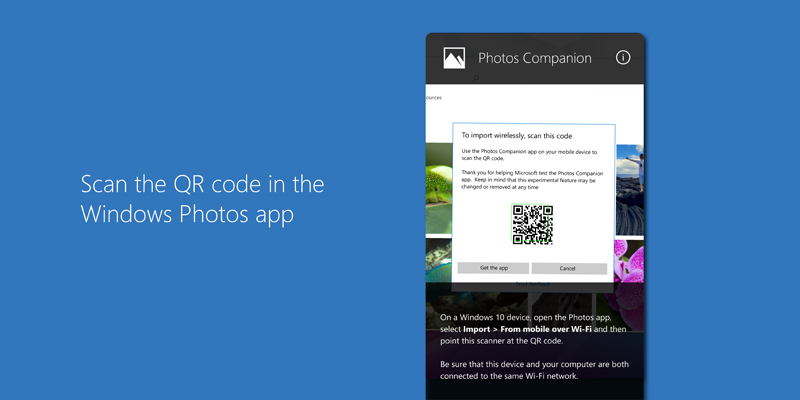
To initiate the transfer, scan the code displayed on the PC screen using the Photos Companion app. This establishes a connection between the two devices, allowing for a seamless transfer of media files. Users have the flexibility to transfer photos and videos from their phone’s camera roll directly into the Photos app on Windows 10.

Creating Video Projects with Photos Companion
One of the intriguing features of the Photos Companion app was its integration with the Photos app on Windows 10 to create engaging video projects. Users could start a video project on their PC and effortlessly add pictures and videos from their mobile devices directly into the project. The app provided users with the option to create their own masterpieces or choose from various themes, letting the app work its magic in crafting a compelling video.
Photos Companion App: Latest Updates and Conclusion
As with many experimental projects, the Photos Companion app has reached its conclusion, and future support is no longer available. However, users who had the opportunity to use this app during its active phase were able to experience the convenience of wirelessly transferring media from their phones to their Windows 10 PCs.
If you were one of the users who enjoyed the benefits of Photos Companion, we recommend exploring alternative solutions for seamless photo and video transfer between your mobile devices and PC. There might be other third-party apps or built-in features that can serve a similar purpose, ensuring a smooth workflow for content management and creativity.
Conclusion,
The Photos Companion app served as an excellent experiment for Microsoft, showcasing their commitment to simplifying the process of media transfer and enhancing user experiences across different platforms. While the app’s journey has ended, its legacy may inspire further innovations in the realm of photo and video management in the future.





