




5 Tips to Avoid Facebook Phishing Scams
- Online communityProductivity
- September 14, 2023
- No Comment
- 34
Introduction: Avoid Facebook Phishing Scams
In today’s digital age, Facebook has become a hub for connecting with friends and family, but it’s also a playground for scammers and cybercriminals. Phishing scams on Facebook can compromise your personal information, leading to identity theft and financial loss. To help you safeguard your online presence, we’ve compiled five essential tips to protect yourself from Facebook phishing scams.
1. Remove Personal Details From Your Facebook Profile:
- Why Scammers Target Personal Information: Phishing scammers are after personal information because it’s a goldmine for them. This data can be exploited in various ways, including accessing bank accounts, stealing identities, or conducting further scams. The more details they have, the more convincing their fraudulent messages can be.
- Protecting Your Profile: You can minimize the risk by limiting the personal information you share on your Facebook profile. Information such as your hometown, school, or workplace can be used by scammers to craft deceptive messages. By keeping your profile anonymous and withholding sensitive details, you make it harder for scammers to exploit your personal information.
2. Manage Your Facebook Privacy Settings:

- Why Privacy Matters: Managing your privacy settings is crucial because it determines who can see your information on Facebook. Without proper settings, your data may be visible to a wider audience than you intend, increasing the risk of it falling into the wrong hands.
- Protecting Your Data: Regularly review and update your privacy settings on Facebook. This ensures that only trusted individuals can access your information. Striking the right balance between sharing and security is essential, and you can find recommended settings in guides like the one provided.
3. Remove Access to Facebook From Suspicious Apps:

- Understanding App Access: Apps often request access to your Facebook profile, and while many are harmless, some may have malicious intent. Granting access to the wrong app could compromise your account.
- Securing Your Profile: Periodically check your Authorized Apps list in Facebook settings. If you encounter apps that you don’t recognize or trust, remove their access. Additionally, be cautious with apps that allow you to log in using Facebook, as they also appear on this list.
4. Don’t Click Strange URLs on Facebook:
- Risks of Clicking Unverified Links: Scammers often use Messenger to distribute malicious links. These links may come with tempting or alarming messages to lure you into clicking. Clicking such links can lead to phishing attempts or malware infection.
- Ensuring Link Safety: If you receive a message containing an unusual link, even from a friend, refrain from clicking it immediately. Instead, ask your friend for clarification about the message’s legitimacy. To verify a link’s safety, you can use reputable link-checking services before opening it.
5. Know the Signs of a Facebook Scam:
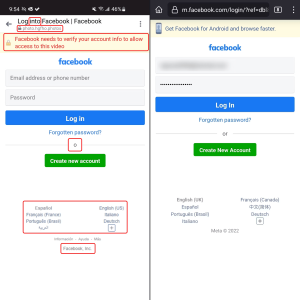
- Recognizing Phishing Scams: Familiarizing yourself with common Facebook phishing scams is essential to stay vigilant. Scammers often send links to fake login pages, aiming to steal your login credentials.
- Key Signs of Scams: One crucial sign to watch for is an email or message asking you to “verify your account” via a link. Facebook typically does not request verification in this manner. Be cautious of misspelled URLs, incorrect language settings, and discrepancies in company footers. Often, scammers use screen captures of real sites instead of creating fake pages, so be wary of such inconsistencies.
| Tip | Description |
|---|---|
| 1. Remove Personal Details | Limit the personal information shared on your Facebook profile to minimize the risk of phishing scams. |
| 2. Manage Privacy Settings | Regularly review and update your Facebook privacy settings to control who can see your information. |
| 3. Remove Access to Suspicious Apps | Revoke access for any unrecognized or suspicious apps that have permission to access your Facebook profile. |
| 4. Don’t Click Strange URLs | Avoid clicking on links in messages that seem out of character for your friends, and use link-checking services to verify link safety. |
| 5. Know Signs of a Facebook Scam | Familiarize yourself with common signs of phishing scams, such as misspelled URLs and incorrect language settings. |
This table provides a quick overview of the five tips discussed in the article, making it easy for readers to grasp the essential points for protecting themselves from Facebook phishing scams.
Conclusion
Staying safe from phishing scams on Facebook is crucial in today’s digital age. These scams are not only prevalent but also constantly evolving. By following the five tips outlined in this article, you can significantly reduce your risk of falling victim to these malicious schemes.
First and foremost, guarding your personal information is paramount. Limit the details you share on your Facebook profile, as cybercriminals often use this information as a starting point for their scams. Review and adjust your privacy settings regularly to ensure that you have control over who can access your information.





